Overview
This post documents a working diskless FreeBSD setup on a Raspberry Pi (8GB) using a UniFi NAS (Debian-based) as the NFS server.
It also highlights common pitfalls, UniFi NAS limitations, and required workarounds.
If you’re trying to boot FreeBSD with:
/mounted read-only over NFS/varmounted read-write over NFS
this guide should save you several hours of troubleshooting.
References
Before starting, review the official documentation:
- 📘 FreeBSD Handbook – Diskless Operation
https://docs.freebsd.org/en/books/handbook/advanced-networking/#network-diskless
NFS Server Configuration (UniFi NAS)
Design
| Mount Point | NFS Path | Mode |
|---|---|---|
/ |
fbsdbase/fb143 |
Read-only |
/var |
rwvar/rpi8gig |
Read-write |
⚠️ Note
UniFi NAS does not exposeno_root_squashin the UI.
You must edit the exports file manually.
/etc/exports.d Configuration
root@UNAS-2:/etc/exports.d# cat shared-*.exports
/var/nfs/shared/server/fbsdbase/fb143 192.168.1.0/24(rw,sync,no_subtree_check,no_root_squash)
/var/nfs/shared/server/rwvar/rpi8gig 192.168.1.0/24(rw,sync,no_subtree_check,no_root_squash)
root@UNAS-2:/etc/exports.d# exportfs -ra
Diskless Client Configuration
Editing fstab
- Mount the diskless root filesystem on another machine
chrootinto it- Edit
/etc/fstab
sudo chroot /mnt/server
# NFS root (read-only)
192.168.1.60:/var/nfs/shared/server/fbsdbase/fb143  /     nfs  ro  0  0

# NFS /var (read-write)
192.168.1.60:/var/nfs/shared/server/rwvar/rpi8gig  /var  nfs  rw  0  0
Memory Disk Size
cat /conf/base/etc/md_size
32768
➡️ This allocates a 32 MB memory disk for early boot operations.
/var Remount Configuration
cat conf/base/var/diskless_remount
192.168.1.60:/var/nfs/shared/server/rwvar/rpi8gig
System Configuration (rc.conf)
hostname="diskless"

ifconfig_DEFAULT="DHCP inet6 accept_rtadv"

sshd_enable="YES"

# Disable Sendmail
sendmail_enable="NONE"
sendmail_submit_enable="NO"
sendmail_outbound_enable="NO"
sendmail_msp_queue_enable="NO"

growfs_enable="YES"
powerd_enable="YES"

# Time sync
ntpdate_enable="YES"
ntpd_enable="YES"
ntpd_sync_on_start="YES"

# NFS / RPC
rpc_statd_enable="YES"
rpc_lockd_enable="YES"
syslogd Dependency Fix
Edit /etc/rc.d/syslogd and ensure netif is included:
- REQUIRE: mountcritremote FILESYSTEMS newsyslog
+ REQUIRE: mountcritremote FILESYSTEMS newsyslog netif
This prevents syslog startup failures during diskless boot.
Rebuilding /etc Image
Whenever anything under /etc changes, rebuild the archive:
tar -c -v -f conf/base/etc.cpio.gz --format cpio --gzip etc
DHCP, TFTP & NetBoot
Ensure your router is configured with:
- DHCP
- TFTP
- Next-server / bootfile options
Example (UniFi UI):
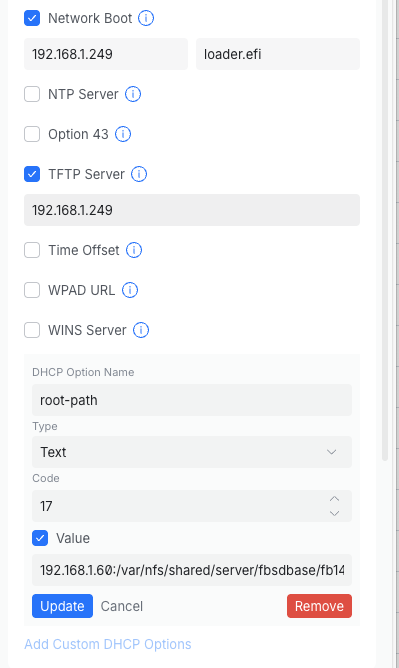
TFTP in UNAS
apt update
apt install -y inetutils-inetd tftpd-hpa
chmod -R 755 /var/nfs/shared/server/tftpboot/
chown -R tftp:tftp /var/nfs/shared/server/tftpboot/
#copy required boot files
scp -r freebsd@192.168.1.249:/b/tftpboot/FreeBSD/arm64/* /var/nfs/shared/server/tftpboot/
#restart server
sudo systemctl enable tftpd-hpa
sudo systemctl restart tftpd-hpa
Final Notes
✅ Root filesystem over NFS (RO)
✅ /var over NFS (RW)
✅ Stable reboots
✅ Works reliably on Raspberry Pi 8GB
Happy hacking & diskless booting! 🚀